Step 1: Download filezilla and instal it.
Step 2: Open Filezilla
Step 3: Enter your FTP connection details at the top quickconnection bar.
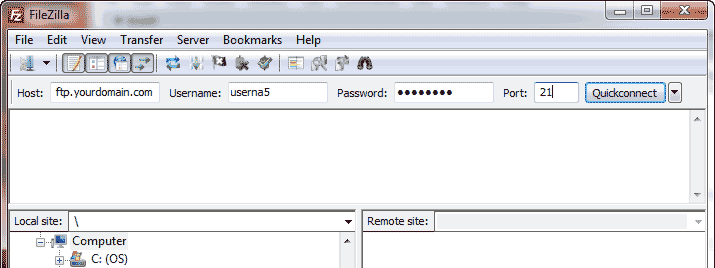
The connection settings are as follows;
Host: domain name or ip
Username: your cpanel username
Password: your cpanel password
Port: 21. It will automatically be applied even if it is not entered.
Step 4: Click Quickconnect
A successful connection will show;
Success:
Command:  MLSD
Response:  150 Accepted data connection
Response:  226-Options: -a -l
Response:  226 27 matches total
Status:  Directory listing successful
If the connection fails with the below error;
Failure:
Response: 530 Login incorrect.
Error: Critical error
Error: Could not connect to serverSuccess
This means that the username and/or the password you are using is not correct.
You can check the cpanel username and password or contact our support to reset it for you.