2026 Sale: Save 10% on all web hosting plans. Enter code BESTHOST10 — offer ends soon.

How to set up Mac Mail to Save Sent Items on the Server

By default when you setup mac mail IMAP it does not store the Sent  items on the server.

If you wish to have your sent items stored on the server you will need to go through a short, simple process in order to have this done:

Step 1:  Select the “Sent” folder in the left side that is listed under the IMAP folders for the account.
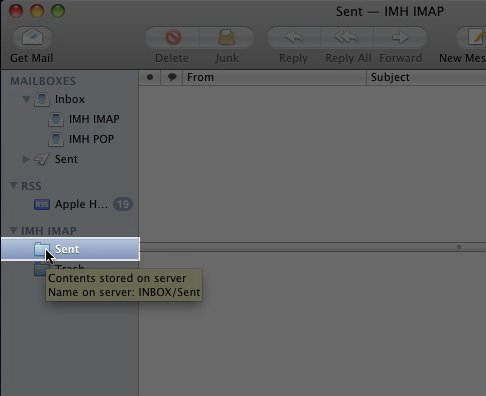
                  sent_fold.jpg

Step 2:  click “Mailbox” from the menu bar.
             Go to “Use This Mailbox For” and in the box that opens up select “Sent”.
             With this done MacMail will now use the “Sent” folder on the server to store sent emails rather than use the local “Sent” folder.

  • 0 Users Found This Useful
  • Mac Mail to Save Sent Items
Was this answer helpful?

Related Articles

Basic Email Settings on Desktop Email Clients

Below are the basic email settings no matter the email client you are using;Non SSL email...

How to Configure emails on an Android device.

Step 1:  Click on the Mail icon on the front screen of your phone.               If the "Mail"...

SPF Records and Domain Keys (DKIM)

cPanel allows users to create their own SPF and Domain Keys (DKIM) records. SPF and DKIM are...

Permanently Stopping Spam with SpamCop

If you are receiving alot of spam emails that you never asked for and you cannot filter them with...

How to Configure emails on Thunderbird

Pre installation Check; This instructions are meant for setting up emails on thunderbird if...